Vector Search & RAG: Implementing Conversational Search with OpenSearch & Open AI
Conversational search builds on retrieval, not just on LLMs. This article shows how a simple RAG layer can be added on top of semantic search using OpenSearch and OpenAI, keeping retrieval and generation separated for clarity.


Intro
If you are here and haven't checked out the first two parts of this series:
I recommend to read them if you want or need a refresher for the theory and the building blocks to implement RAG.
In this final chapter, we will go over the implementation details of a chat-based search example.
Problem
Below is a short problem statement that we can use as baseline to go over the solution:
An online store that sells furniture and home accessories wants to offer a chat-based search experience where users can ask natural language questions like “What’s a comfy sofa for a small living room?” and receive a direct, conversational answer grounded in the store’s actual product catalog.
Solution
Given that the problem statement mentions the chat-based search we can infer that RAG is a good fit for this use case. The diagram shows a high level representation of the implementation solution using both OpenSearch and OpenAI API, keep in mind, OpenSearch provides tools for you to also implement RAG in the same platform so you have everything in one place, for the purposes of this article and clarity in the explanation I will use OpenAI separately so we can see the process more clearly.
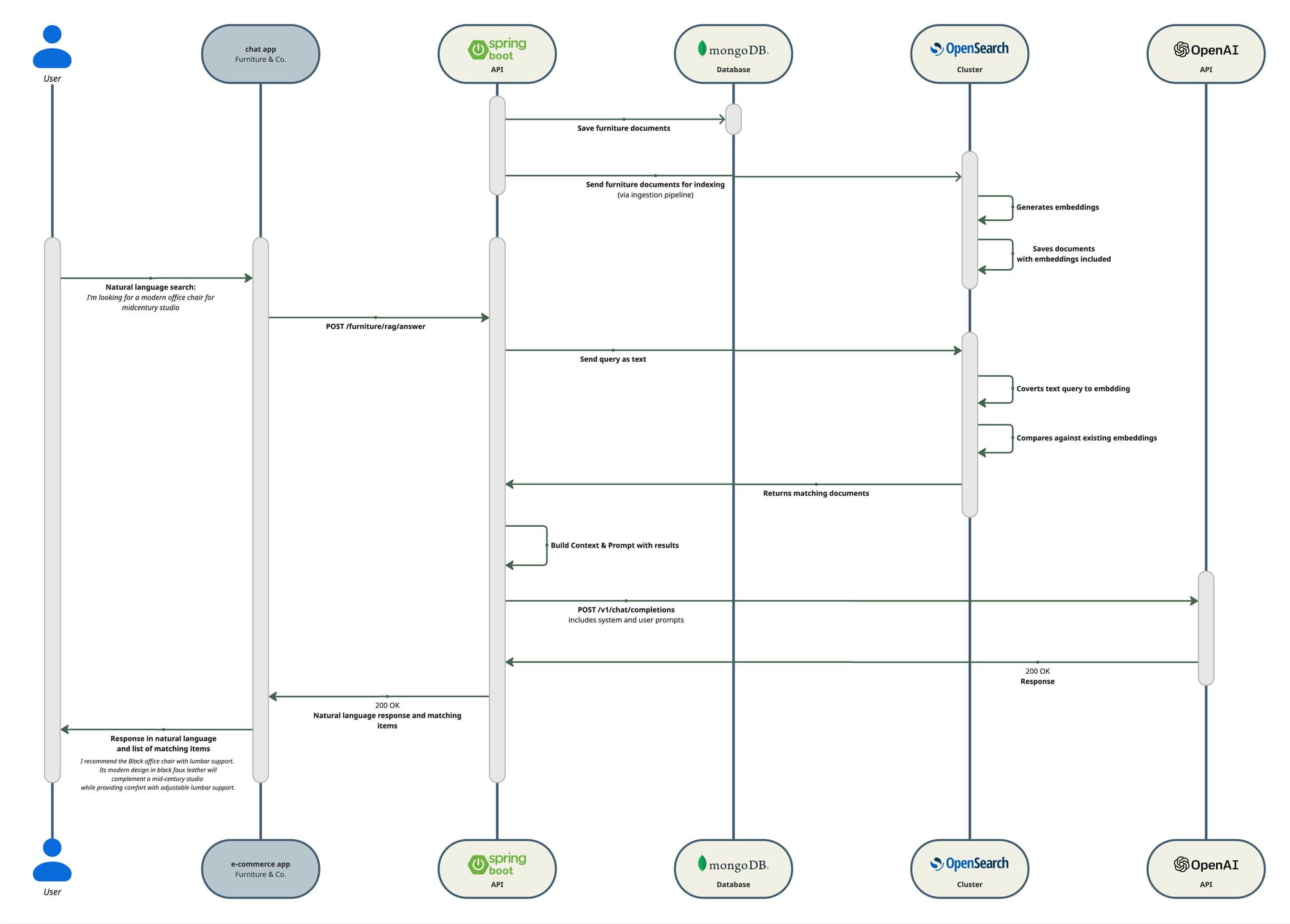
As the diagram shows, we will build the RAG functionality on top of our semantic search functionality, for that reason the tech stack remains with just one addition.
Tech stack
Same as we already had in our previous article, plus:
| Tool | Description |
|---|---|
| OpenAI API | To interact with an LLM, pass context, and receive answers in natural language. |
Steps
- Create an OpenAI account
Go to https://platform.openai.com and sign in (or create an account).
This is separate from ChatGPT usage, even if you have ChatGPT Plus, you still need to do this.
- Get API Key
Navigate to the API keys page. Once logged in:
- Open https://platform.openai.com/account/api-keys
- Click “Create new secret key”
- Give it a name (e.g. furniture-rag-local)
- Copy it. Note! You won’t be able to see it again
Important: make sure billing is enabled
- Go to https://platform.openai.com/account/billing
- Add a payment method
- Make sure the account is active
- Create a mini OpenAIClient
This class is minimal and its only responsibility is to make REST calls to the OpenAI API.
override fun generateAnswer(systemPrompt: String, userPrompt: String): String {
        val request = mapOf(
            "model" to props.model,
            "messages" to listOf(
                mapOf("role" to "system", "content" to systemPrompt),
                mapOf("role" to "user", "content" to userPrompt),
            ),
            "temperature" to 0.2
        )

        try {
            val response = client.post()
                .uri("/v1/chat/completions")
                .contentType(MediaType.APPLICATION_JSON)
                .body(request)
                .retrieve()
                .body(OpenAiResponse::class.java)

            val content = response?.choices?.firstOrNull()?.message?.content
            if (content.isNullOrBlank()) {
                throw RuntimeException("LLM response content blank or no choices")
            }
            return content.trim()
        } catch (e: Exception) {
            log.error("OpenAI error: {}", e.message, e)
            throw e
        }
    }
OpenAILlmClient
- Create a REST endpoint to get a natural language response
Finally, same as for semantic search, we will create an endpoint (this time a POST) that will interact with a RagService responsible to create the context based on the matches from the semantic search and build the prompt and build a response in natural language with both responses from OpenAI API and semantic search results.
@PostMapping("/answer")
fun answer(@RequestBody body: RagRequest): ResponseEntity<RagResponse> {
   val question = body.question.trim()
   if (question.isBlank()) {
       return ResponseEntity.status(HttpStatus.BAD_REQUEST).build()
   }
   return try {
       val resp = ragService.answer(question, body.k)
       ResponseEntity.ok(resp)
   } catch (e: LlmUpstreamException) {
       log.error("LLM upstream failure", e)
       ResponseEntity.status(HttpStatus.BAD_GATEWAY).build()
   }
}fun answer(question: String, k: Int = 5): RagResponse {
val q = question.trim()
require(q.isNotBlank()) { "Question must not be blank" }
val items = try {
searchService.searchBySemanticSimilarity(q, k)
} catch (e: Exception) {
log.error("Retrieval failed", e)
emptyList()
}
if (items.isEmpty()) {
return RagResponse(
answer = "I couldn’t find relevant items for your question. Please try rephrasing or provide more details.",
sources = emptyList()
)
}
val context = buildContext(items)
val systemPrompt = SYSTEM_PROMPT
val userPrompt = buildUserPrompt(q, context)
val answer = try {
llmClient.generateAnswer(systemPrompt, userPrompt)
} catch (e: Exception) {
log.error("LLM call failed", e)
throw LlmUpstreamException("LLM call failed", e)
}
val sources = items.map { it.toSource() }
return RagResponse(answer = answer, sources = sources)
}RagService
Conclusion
Over this series, we’ve built from search fundamentals to semantic retrieval to conversational interaction, a layering that reflects how real systems compose these capabilities.
The proof of concept intentionally focuses on establishing a clear mental model and a minimal, working implementation of semantic and conversational search. It does not cover production-level concerns such as document chunking strategies, hybrid ranking (e.g. BM25 + vector reranking), evaluation and relevance metrics, prompt optimization, latency and cost trade-offs, access control, or handling large-scale datasets. These aspects become critical when moving beyond a POC, but they are deliberately left out here to keep the focus on understanding how the core building blocks fit together. Once this foundation is clear, each of those topics can be explored and layered on incrementally, depending on the specific requirements of a real system.