Vector Search: Implementing Semantic Search with OpenSearch
This article walks through a minimal proof of concept for implementing semantic search with OpenSearch. The focus is on showing how embeddings, indexing, and vector search fit together in practice.


Introduction
If you are here and haven't checked out the first part of this series, I recommend to read if you want or need a refresher about some of the different searching terms, including vector search.
In this part, we will go over some of the implementation details for an example of Semantic Search using OpenSearch.
OpenSearch
OpenSearch is a search and analytics engine that provides a lot of features to implement some of the search types and uses the tools described above.
In this article I will show a minimal proof of concept on how to implement Semantic Search. To do this we need to first have a problem statement, so let's get into it.
Problem
When working on a POC I like to first to outline a brief problem statement that makes it easier to reason about the solution. So for this case we have the following:
An e-commerce company that sells furniture and home accessories wants to implement a free text search feature that allows users to search using phrases like “comfy sofa for a small living room” and still receive relevant results, even if those exact words are not present in the product data.
Solution
Given that the problem mentions search should turn some results even if the exact words are not present, give us a hint that semantic search is required in this case, so the following diagram shows a high level representation of the implementation solution.
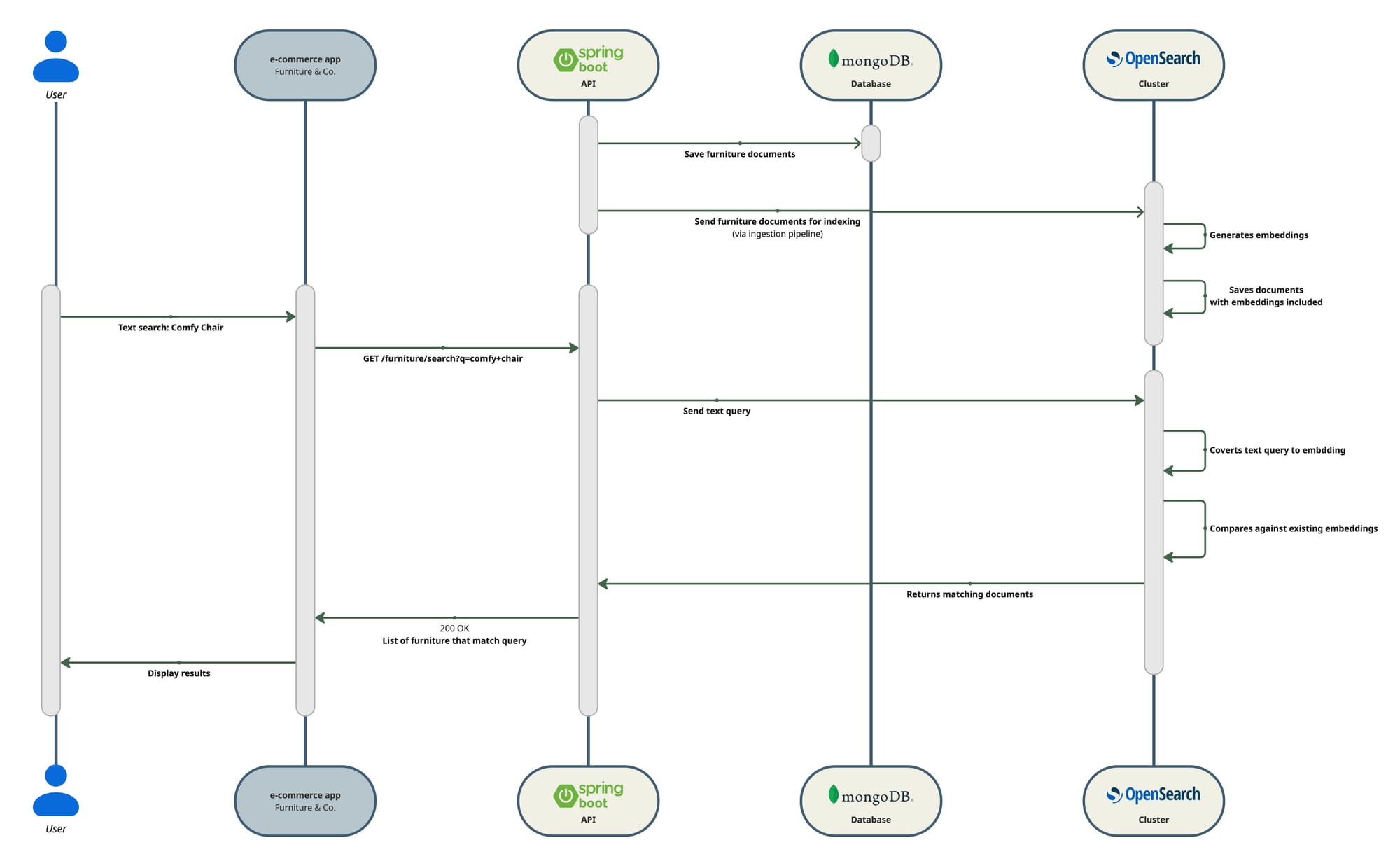
Once we have the main idea clear we can go to the implementation details. The diagram already shows what tech stack we will use but I will give a brief description for each.
Tech stack
| Tool | Description |
|---|---|
| Spring Boot | Backend application exposing a search endpoint. |
| MongoDB | Database storing the furniture catalog’s structured data. |
| OpenSearch | Generates embeddings and indexes furniture data for search. |
Steps
- Create SpringBoot app.
I won’t go into details into this, use your preferred method and configuration preferences. For this example I’m using Kotlin, Gradle and MVC style endpoints. There are some of the main dependencies I use:
// Official OpenSearch Java client (supports k-NN index/search APIs)
implementation("org.opensearch.client:opensearch-java:${property("openSearchClientVersion")}")
// Low-level REST client required by opensearch-java transport
implementation("org.opensearch.client:opensearch-rest-client:${property("openSearchClientVersion")}")
build.gradle.kts
- Setup necessary infrastructure locally
For this I’m using Docker compose, below is my minimal setup:
version: "3.8"

services:
 # Run MongoDB in Docker, no authentication for simple local development
 mongo:
   image: mongo:7
   container_name: mongo
   ports:
     - "27017:27017"
   volumes:
     - mongo_data:/data/db

 opensearch:
   image: opensearchproject/opensearch:2.19.4
   container_name: opensearch
   environment:
     cluster.routing.allocation.disk.threshold_enabled: "false"
     bootstrap.memory_lock: "true"
     discovery.type: single-node
     # For OpenSearch 2.12+ the correct way to disable the security plugin in Docker
     # is to set this env var. This avoids the need for initial admin password
     # and HTTPS certificates for simple local development.
     DISABLE_SECURITY_PLUGIN: "true"
     cluster.name: docker-cluster
     node.name: opensearch-node
     node.roles: cluster_manager,data,ingest,ml
     OPENSEARCH_JAVA_OPTS: "-Xms3g -Xmx3g"
   ulimits:
     memlock:
       soft: -1
       hard: -1
     nofile:
       soft: 65536
       hard: 65536
   ports:
     - "9200:9200"
     - "9600:9600"  # performance analyzer
   volumes:
     - opensearch_data:/usr/share/opensearch/data
   healthcheck:
     test: [ "CMD-SHELL", "curl -s http://localhost:9200 >/dev/null || exit 1" ]
     interval: 10s
     timeout: 5s
     retries: 30
 opensearch-dashboards:
   image: opensearchproject/opensearch-dashboards:2.19.4
   container_name: opensearch-dashboards
   depends_on:
     - opensearch
   environment:
     # Point Dashboards to the OpenSearch node
     OPENSEARCH_HOSTS: "[\"http://opensearch:9200\"]"
     # Disable the security plugin in Dashboards to match the OpenSearch node
     DISABLE_SECURITY_DASHBOARDS_PLUGIN: "true"
     # Bind to all interfaces in the container so the port is reachable from host
     SERVER_HOST: "0.0.0.0"
   ports:
     - "5601:5601"

volumes:
 mongo_data:
 opensearch_data:
docker-compose.yml
- Pre-populate database into Mongo DB database with fake data for our POC purposes
You can do this via a script or directly in your Spring app, I choose the latter, I won’t show the code here as it is trivial. You can inspect the whole codebase and details in the link I will provide below.
- Create a simple REST endpoint that returns a list of furniture
You don’t need this but it is helpful for debugging purposes. Again, this is trivial and you can see the details in the repository.
- Select, register and deploy embedding model in OpenSearch
There’s plenty of info about this and I don’t want to repeat it, in fact OpenSearch has a great video that explains how to do this.
But if you want to take a sneak pick these are the endpoints I used in their dev console to do my setup:
## Register Embedding model
POST /_plugins/_ml/models/_register
{
   "name": "huggingface/sentence-transformers/all-MiniLM-L6-v2",
   "version": "1.0.2",
   "description": "This is a sentence-transformers model: It maps sentences & paragraphs to a 384 dimensional dense vector space and can be used for tasks like clustering or semantic search.",
   "model_format": "ONNX",
   "model_task_type": "TEXT_EMBEDDING",
   "model_config": {
       "model_type": "bert",
       "embedding_dimension": 384,
       "framework_type": "sentence_transformers",
       "pooling_mode": "MEAN",
       "normalize_result": true,
       "all_config": "{\"_name_or_path\": \"sentence-transformers/all-MiniLM-L6-v2\", \"architectures\": [\"BertModel\"], \"attention_probs_dropout_prob\": 0.1, \"classifier_dropout\": null, \"gradient_checkpointing\": false, \"hidden_act\": \"gelu\", \"hidden_dropout_prob\": 0.1, \"hidden_size\": 384, \"initializer_range\": 0.02, \"intermediate_size\": 1536, \"layer_norm_eps\": 1e-12, \"max_position_embeddings\": 512, \"model_type\": \"bert\", \"num_attention_heads\": 12, \"num_hidden_layers\": 6, \"pad_token_id\": 0, \"position_embedding_type\": \"absolute\", \"torch_dtype\": \"float32\", \"transformers_version\": \"4.49.0\", \"type_vocab_size\": 2, \"use_cache\": true, \"vocab_size\": 30522}",
       "additional_config": {
           "space_type": "l2"
       }
   },
   "model_content_size_in_bytes": 91719191,
   "model_content_hash_value": "89b6737ca1745a89eafdf37cc7de2a3aae05aca9aac32ac50a3349add67206bb"
}


## Check if registration was successful and copy model Id
GET /_plugins/_ml/tasks/REGISTRATION_TASK_ID


## Deploy Model
POST /_plugins/_ml/models/MODEL_ID/_deploy


## Check if deployment was successful
GET /_plugins/_ml/tasks/DEPLOY_TASK_ID
OpenSearch Dev Tools
- Create Ingest pipeline in OpenSearch
The same video I shared above shows how to create an ingestion pipeline, here’s what I used for quick reference:
## Create ingest pipeline
PUT /_ingest/pipeline/furniture-embedding-pipeline
{
 "description": "Generate embeddings for furniture documents",
 "processors": [
   {
     "text_embedding": {
       "model_id": "a-WSJ5sBcArueEazCxGO",
       "field_map": {
         "embedding_text": "vector"
       }
     }
   }
 ]
}


# Check if the new pipeline is there
GET /_ingest/pipeline
OpenSearch Dev Tools
And this is the snippet of code where I sent the mongo documents and that will be ingested by the pipeline I created:
fun reindexAllFurniture() {
   val indexName = openSearchProperties.index
   furnitureRepository.findAll().forEach { item ->
       val embeddingText = buildString {
           append(item.name)
           append("\n")
           append(item.description)
           append("\n")
           append(item.tags.joinToString(", "))
       }
       val doc = mapOf(
           "name" to item.name,
           "description" to item.description,
           "tags" to item.tags,
           "price" to item.price,
           "embedding_text" to embeddingText
       )
       try {
           openSearchClient.index {
               it.index(indexName).id(item.id.toString()).document(doc)
           }
       } catch (e: Exception) {
           log.error("Unable to reindex index", e)
       }
   }
}
FurnitureSemanticIndexer
- Create REST search endpoint
Finally putting all together my REST endpoint interacts with a dedicated service that I created to talk to the Java OpenSearch client and get matching results.
val boundedSize = size.coerceIn(1, 20)
val items = searchService.searchBySemanticSimilarity(query, boundedSize)
return items.map { it.toDto() }
FurnitureSearchController
fun searchBySemanticSimilarity(query: String, limit: Int = 5): List<FurnitureItem> {
   if (query.isBlank()) return emptyList()
   val indexName = openSearchProperties.index
   val response = openSearchClient.search(
       { builder ->
           builder.index(indexName)
               .size(limit)
               .source { src ->
                   src.filter { f ->
                       f.includes("name", "description", "tags")
                   }
               }
               .query { q ->
                   q.neural { n ->
                       n.field("vector")
                           .queryText(query)
                           .modelId(openSearchProperties.modelId)
                           .k(limit)
                   }
               }
       },
       Map::class.java
   )
   ...
}
FurnitureSearchService
Keep in mind that this article focuses on wiring the components together, it’s worth noting that the quality of semantic search depends less on the code itself and more on how your data is represented before it’s embedded and other things such as the selection of the embedding model.
Next
With this foundation, we can now easily implement a very simplified RAG version using the same codebase as baseline version to achieve a chat-based search.